22 min read
21 Best Framer Templates (2026): Free and Premium Picks
Choosing a Framer template is no longer a matter of finding one that looks good. The strongest templates also provide the right pages, CMS structure, navigation and conversion paths for the website you need to build.
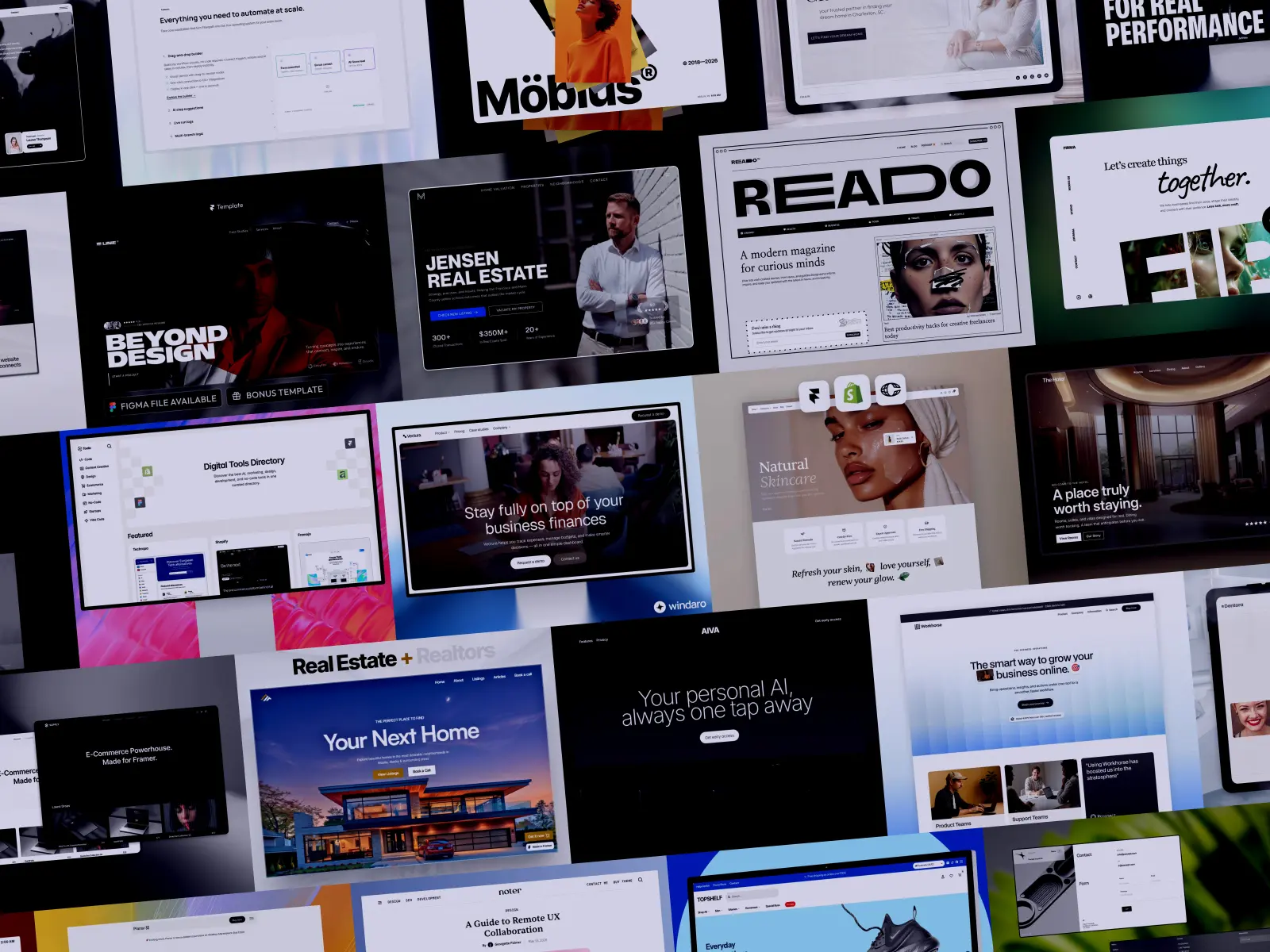
This guide brings together 21 of the best Framer templates available in 2026, covering SaaS products, agencies, portfolios, professional services, ecommerce, real estate, publications and more. Rather than naming a single overall winner, we selected templates for specific use cases. A flexible startup website and a property directory solve very different problems, even if both are well designed.
The selection is independent and is not limited to templates listed on GYFT. Some are paid, others are free, and every template was assessed on its practical strengths as well as its limitations.
Prices and availability were checked in August 2026. Template prices can change and may not include the Framer site plan, third-party plugins or external services required to use every feature.
The Best Framer Templates at a Glance
Template | Best for | Category | Price |
|---|
Complex SaaS and automation products | SaaS & Startups | $120 |
Flexible startup and SaaS websites | SaaS & Startups | $99 |
Fintech and finance-focused SaaS | SaaS & Startups | $129 |
Digital and product agencies | Agencies | $129 |
Bold creative agencies and studios | Agencies | $129 |
Established, conversion-focused agencies | Agencies | $179 |
Creative studios and independent designers | Portfolios | $129 |
Filmmakers, video editors and motion designers | Portfolios | $129 |
UX and product designers | Portfolios | Free |
AI-powered mobile apps and assistants | AI & Technology | $149 |
Robotics, manufacturing and hardtech companies | AI & Technology | $99 |
Technology consulting firms | Professional Services | Free |
Dental clinics and private healthcare practices | Professional Services | $79 |
Shopify stores with larger product catalogs | Ecommerce | $129 |
Premium fashion brands | Ecommerce | $199 |
Luxury agents and boutique real estate agencies | Real Estate | $99 |
Solo realtors and adaptable agency websites | Real Estate | $99 |
Digital publications and multimedia editorial projects | Blogs & Publications | Free |
Independent writers and small publications | Blogs & Publications | Free |
Hotels, resorts and hospitality businesses | Free Templates | Free |
Tool directories and resource websites | Free Templates | Free |
How We Chose the Best Framer Templates
This is not a ranking from first to twenty-first. Each template was evaluated within its intended category and selected because it provides a particularly strong foundation for a specific type of website.
Our assessment considered:
Fit for purpose: Whether the template is genuinely structured around its intended audience rather than simply restyled for a particular industry.
Page depth: The range and usefulness of the included pages, especially beyond the homepage.
CMS implementation: How effectively Framer CMS is used for content such as projects, properties, products, articles, team members or case studies.
Navigation and discovery: The presence of useful search, filtering, categories and other ways to explore larger collections of content.
Visual quality: The consistency of the typography, layout, imagery and interactions across the website.
Conversion structure: Whether the template gives visitors clear paths towards making an enquiry, booking a consultation, starting a trial or purchasing a product.
Customization: How easily the design and structure can be adapted without rebuilding substantial parts of the website.
Value: Whether the template’s depth, specialization and included resources justify its price.
Dependencies: Any additional services, plugins or technical setup required for the advertised experience.
The evaluation is based on publicly available Marketplace information, documented features, page structures and live previews where available. We have not tested every template in a production project or independently verified the quality of every creator’s ongoing customer support.
With those criteria in mind, here are the templates that stood out in each category.
Best Framer Templates for SaaS and Startups
A SaaS template needs to explain more than what a product does. It should accommodate product visuals, use cases, customer evidence, pricing and resources without making the website difficult to navigate. These three templates approach that challenge from different angles.
For a broader selection, explore our curated SaaS website templates for software products, AI platforms, and growing startups.
1. Flowpath — Best for Complex SaaS and Automation Products
Creator: Cristian Mielu
Price: $120
View on Framer Marketplace
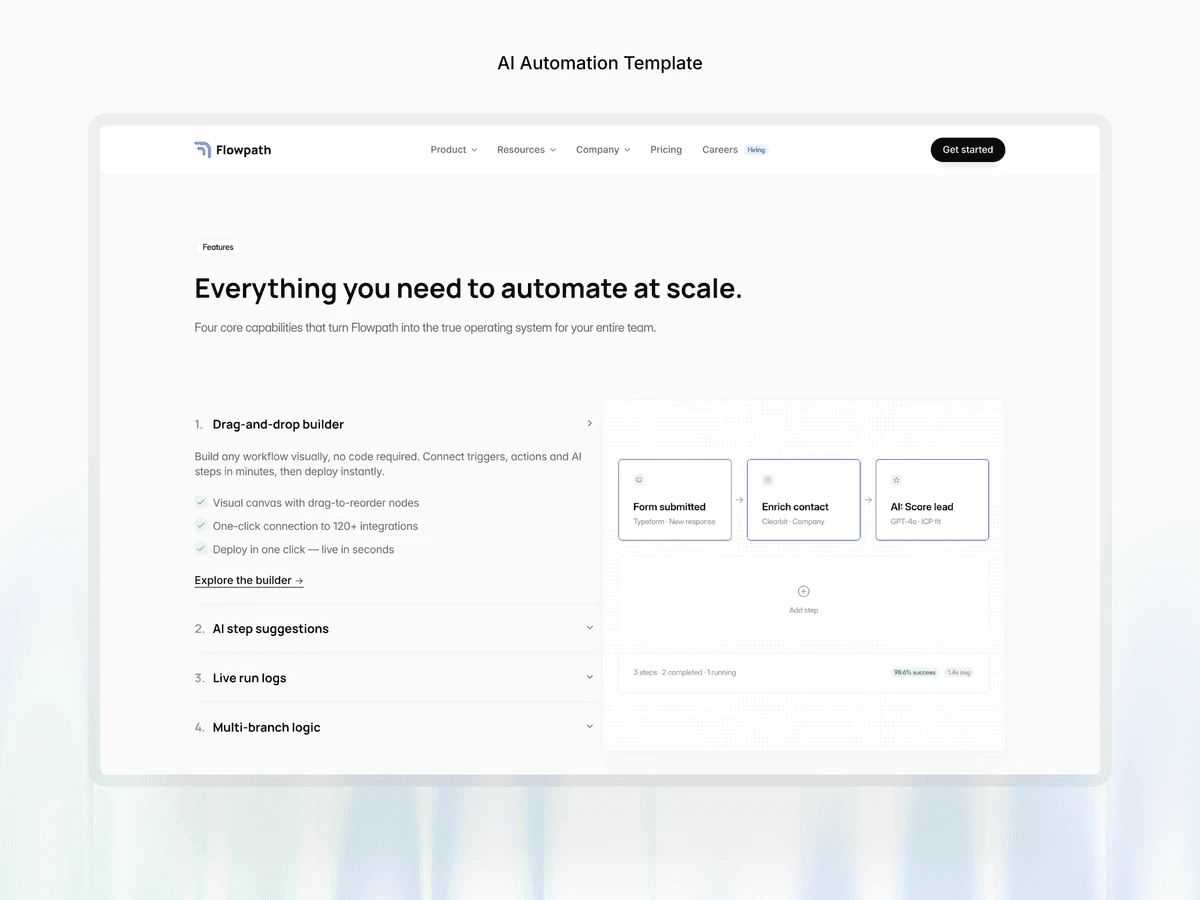
Flowpath is built for software products that require more explanation than a conventional landing page can provide. Its 25 pages, ten CMS collections and library of more than 100 reusable components create enough room for features, integrations, use cases, customer stories and educational content.
The template is especially well suited to automation platforms and B2B products with several audiences or workflows. Search and a structured content system help users navigate the larger website, while the included copy provides a more useful starting point than generic placeholder text.
Why it stands out: Flowpath offers the depth needed to turn a complex product into a coherent marketing website. Its reusable components also make it easier to expand without designing every new section from scratch.
What to consider: It is likely to be excessive for a startup that only needs a focused landing page. Its automation-oriented content and visual language will also require more adaptation for products in unrelated industries.
2. Workhorse — Best for Flexible Startup Websites
Creator: Medium Rare
Price: $99
Workhorse is a modular SaaS template designed to accommodate different products and stages of growth. It includes more than 60 section layouts that can be combined to create pages around product features, screenshots, photography, social proof and conversion points.
Its CMS collections cover careers, team members, articles and customer stories, giving startups a practical foundation for both marketing and ongoing publishing. The visual system is neutral enough to support a broad range of software products without immediately looking tied to one industry.
Why it stands out: Its main strength is flexibility. Workhorse provides more room to assemble a distinctive website than templates built around one rigid page sequence.
What to consider: Modularity transfers some decisions back to the buyer. Teams will still need to choose the right sections, establish a clear hierarchy and remove layouts they do not need. It is a strong toolkit, but not necessarily the fastest option for someone seeking an almost finished website.
3. Vectura — Best for Fintech SaaS
Creator: Krzysztof Hejna
Price: $129
Vectura combines the structure of a SaaS website with the more restrained visual language expected from financial products. It includes dedicated product content, categorized articles and detailed case studies, allowing a fintech company to explain its technology while building trust through evidence and educational material.
The template avoids some of the exaggerated gradients and futuristic imagery commonly used by technology websites. Instead, its layouts feel measured and information-led, making it a credible foundation for payment platforms, financial infrastructure, investment tools or business finance software.
Why it stands out: Vectura is not simply a general SaaS template filled with finance-related placeholder copy. Its visual hierarchy and content structure are better aligned with a sector where clarity and credibility are especially important.
What to consider: That focused direction makes it less suitable for playful consumer applications or startups that want a more expressive identity.
Also worth considering: Planar, created by Medium Rare, is a $99 alternative for startups that want the same creator’s modular approach in a more focused product-marketing format.
Best Framer Templates for Agencies
Agency websites must do several jobs at once: establish a point of view, explain services, demonstrate previous work and make it easy for potential clients to start a conversation. The best option depends partly on whether the agency wants to appear experimental, design-led or operationally established.
4. Trifecta — Best for Digital and Product Agencies
Creator: Anatolii Dmitrienko
Price: $129
Trifecta uses a distinctive sidebar-led layout to give digital agencies a recognizable identity without sacrificing the content clients expect to find. It includes services, process, packages, case studies and lead-generation sections, as well as CMS-powered search and filtering for larger project collections.
The template is particularly effective for product, design and development agencies that want their website to feel considered but still easy to understand. Its structure supports both the initial sales argument and the deeper evidence required by visitors comparing potential partners.
Why it stands out: Trifecta balances visual character with a practical agency architecture. The navigation is memorable, while case studies and service content remain accessible.
What to consider: The sidebar is a defining part of the experience. Agencies with conservative clients or a more traditional corporate identity may find it too prominent and should expect to revise the navigation system.
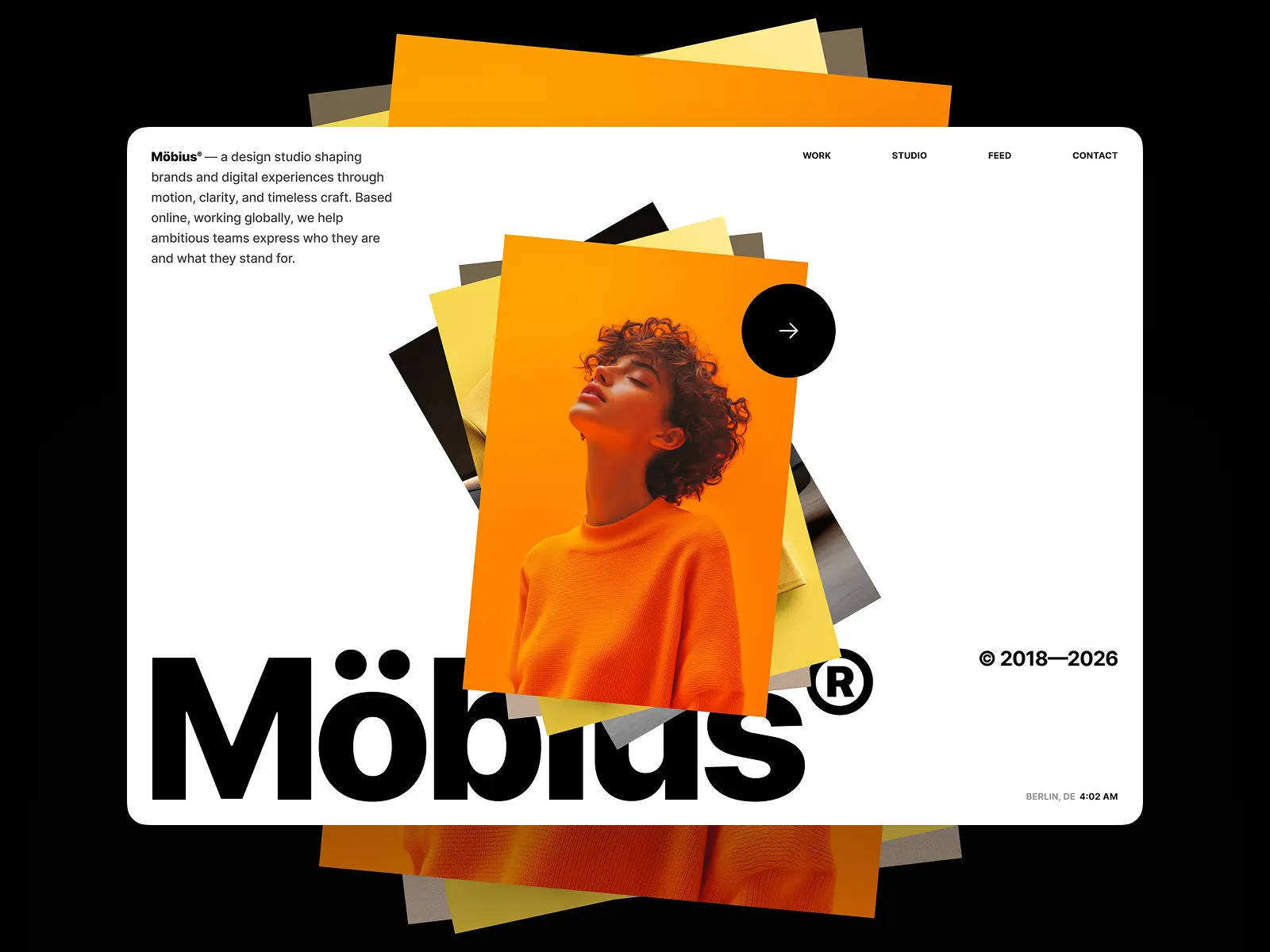
5. Möbius — Best for Bold Creative Studios
Creator: Anton Drukarov
Price: $129
View on Framer Marketplace
Möbius is the most expressive agency template in this selection. Its grid, motion and page architecture create a strong sense of direction, making it particularly suitable for creative studios whose website needs to demonstrate design ability before visitors read a case study.
Beneath that presentation, the template has a substantial system: 12 custom components, two code overrides and CMS collections for projects, journal entries and categories. Documentation is included to help users work with its more advanced interactions and components.
Why it stands out: Möbius feels designed as a complete digital experience rather than assembled from familiar agency sections. It offers both a distinctive frontend and enough structure to manage an evolving body of work.
What to consider: Its personality will not suit every agency. Conservative consultancies and teams that prioritize immediate simplicity over visual experimentation may need to remove much of what makes the template distinctive.
6. Linie — Best for Established, Conversion-Focused Agencies
Creator: Slava Burian
Price: $179
Linie is designed for agencies that need to communicate organizational depth as well as creative quality. Its structure covers services, case studies, team members, testimonials, articles, careers and frequently asked questions, providing a more complete foundation for an established business.
The content hierarchy is comparatively conventional, but that is part of its value. Visitors can quickly understand what the agency offers, inspect relevant work, assess its expertise and find a clear route to make contact. The extensive CMS implementation also makes recurring content easier to manage.
Why it stands out: Linie is one of the most comprehensive agency templates in the selection. It is suitable for teams that have outgrown a portfolio-style website and need something closer to a full company presence.
What to consider: At $179, it is the most expensive agency option here. Its structured, conversion-focused approach may also feel less distinctive to studios seeking an unconventional web experience.
Also worth considering: Firma, created by Anton Drukarov, costs $129 and uses horizontal scrolling to create a more experimental presentation. It is worth considering when that interaction supports the agency’s identity, although it is less universally practical than Möbius.
Best Framer Portfolio Templates
A portfolio should reflect the kind of work its owner wants to attract. A filmmaker needs a very different presentation from a product designer, while a multidisciplinary studio may need a broader project system. These three templates were selected because each is built around a distinct creative practice.
7. Fabrica — Best for Creative Studios and Independent Designers
Creator: Anatolii Dmitrienko
Price: $129
Fabrica pairs a restrained monochrome design with a flexible CMS portfolio, making it suitable for independent designers, creative directors and small studios. Its project system includes native search and filtering, helping visitors navigate a growing body of work without turning the homepage into an exhaustive archive.
Additional pages for the studio, articles and legal content make Fabrica more complete than a minimal portfolio showcase. The visual direction is intentionally quiet, allowing typography, imagery and project outcomes to carry most of the identity.
Why it stands out: Fabrica provides a timeless foundation without feeling empty or underdeveloped. Its search and filtering are particularly useful for creatives who work across several disciplines or maintain a larger archive.
What to consider: The monochrome system places considerable responsibility on the project imagery. Portfolios with inconsistent or limited visual assets may struggle to achieve the same level of polish as the demo.
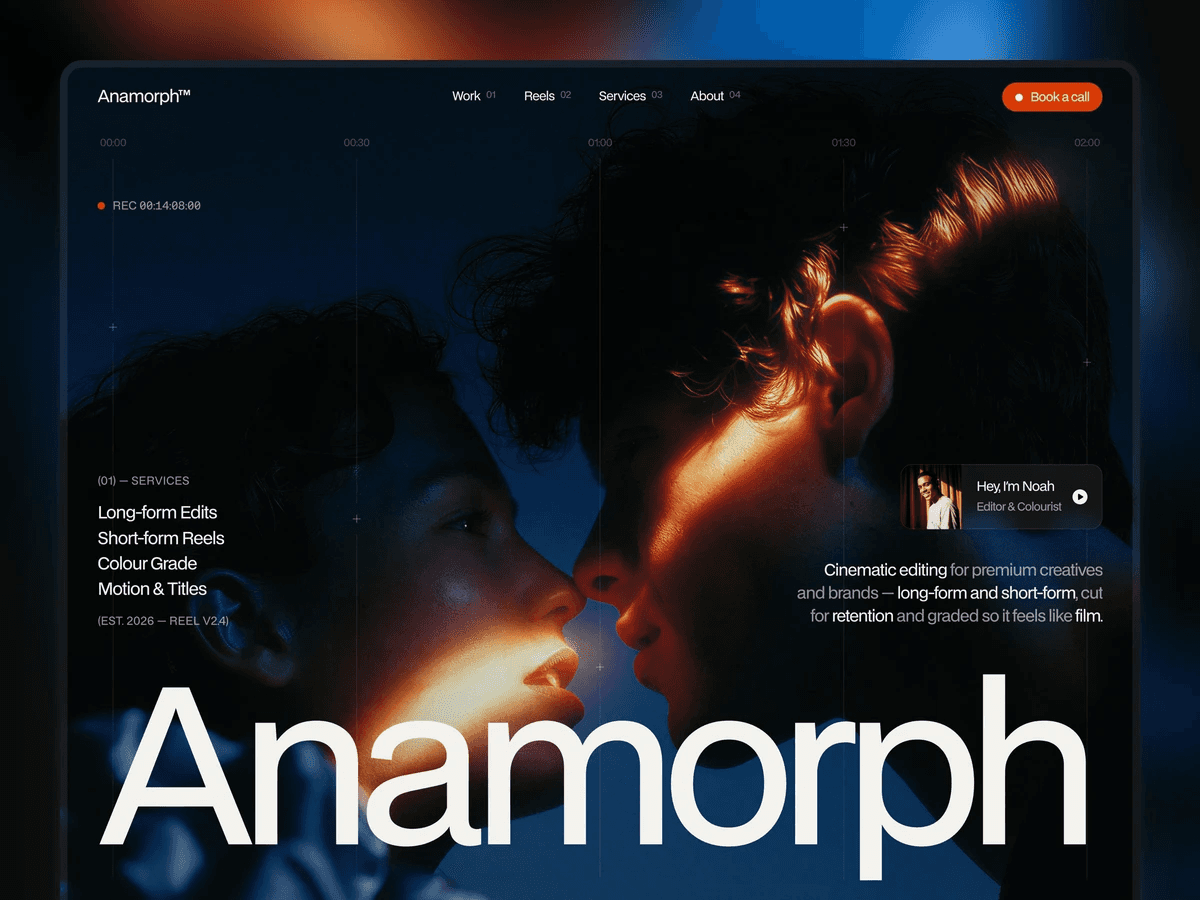
8. Anamorph — Best for Filmmakers and Video Professionals
Creator: Hamza Ehsan
Price: $129
Anamorph is designed specifically for video editors, filmmakers and motion designers. Instead of treating video as an image replacement, it builds the experience around showreels, hover playback, fullscreen project pages and vertical 9:16 work.
The template also includes pricing, availability, a project brief form and a thank-you page, allowing a creative professional to present work and manage the first stage of a client enquiry within the same website. CMS-powered screening pages make it easier to add new projects without reconstructing their presentation.
Why it stands out: Anamorph understands the formats and interactions required by video work. Vertical content, playback behaviour and fullscreen viewing are core parts of the template rather than optional additions.
What to consider: Its specialization limits its adaptability. Photographers, illustrators and product designers would need to replace much of the structure that gives Anamorph its value. Video-heavy websites also require careful media optimization to preserve loading performance.
9. Tabfolio — Best Free Portfolio for UX and Product Designers
Creator: Sebastian
Price: Free
Tabfolio is structured around detailed UX and product design case studies rather than a gallery of finished visuals. Projects can contain up to six sections and combine text, images, video, galleries and lightboxes, giving designers enough flexibility to explain research, decisions and outcomes.
The CMS makes it straightforward to add and manage projects, while the modular About page and résumé content provide the supporting information expected from an individual portfolio. Documentation is also included, which is particularly useful for designers building their first website in Framer.
Why it stands out: Many portfolio templates prioritize visual impact but provide little space for process. Tabfolio offers a more credible foundation for disciplines where the reasoning behind the work matters as much as the final interface.
What to consider: The free version uses a shared CMS structure for its case studies, so projects are expected to follow broadly similar layouts. Designers who need a completely different narrative for every project may find that restrictive.
Best Framer Templates for AI and Technology
Technology templates often rely on the same dark interfaces, gradients and abstract graphics regardless of the product being presented. AIIVA and Precept stand out because they are designed around two specific forms of technology: intelligent mobile software and physical industrial systems.

10. AIIVA — Best for AI-Powered Mobile Apps
Creator: Gabe Tognon
Price: $149
View on Framer Marketplace
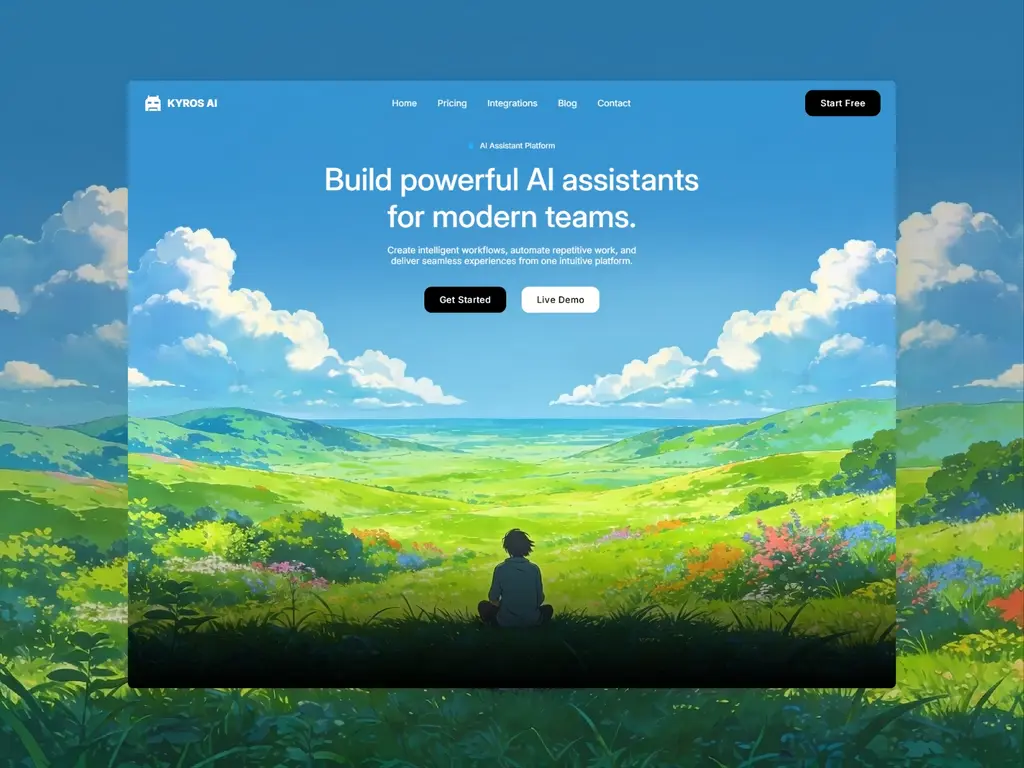
AIIVA is built around a cinematic 3D phone presentation that demonstrates an AI product through the device on which it is used. A configurable conversation interface can show different messages, states, timings, icons and privacy indicators, allowing the website to communicate how an assistant behaves rather than merely describe its features.
This approach makes AIIVA particularly suitable for mobile assistants, productivity applications and consumer AI products where the in-app experience is central to the sales argument. Motion and device transitions create a polished narrative without requiring the visitor to imagine the product from static screenshots.
Why it stands out: The interface demonstration is not a decorative mockup. It is a configurable storytelling system that can make an unfamiliar AI interaction easier to understand.
What to consider: AIIVA is heavily dependent on the mobile-device concept. Desktop platforms, infrastructure products and services without a conversational interface would need substantial restructuring. Its 3D presentation also requires careful testing after customization to ensure that motion remains smooth across devices.
11. Precept — Best for Robotics and Hardtech Companies
Creator: Flowit Supply
Price: $99
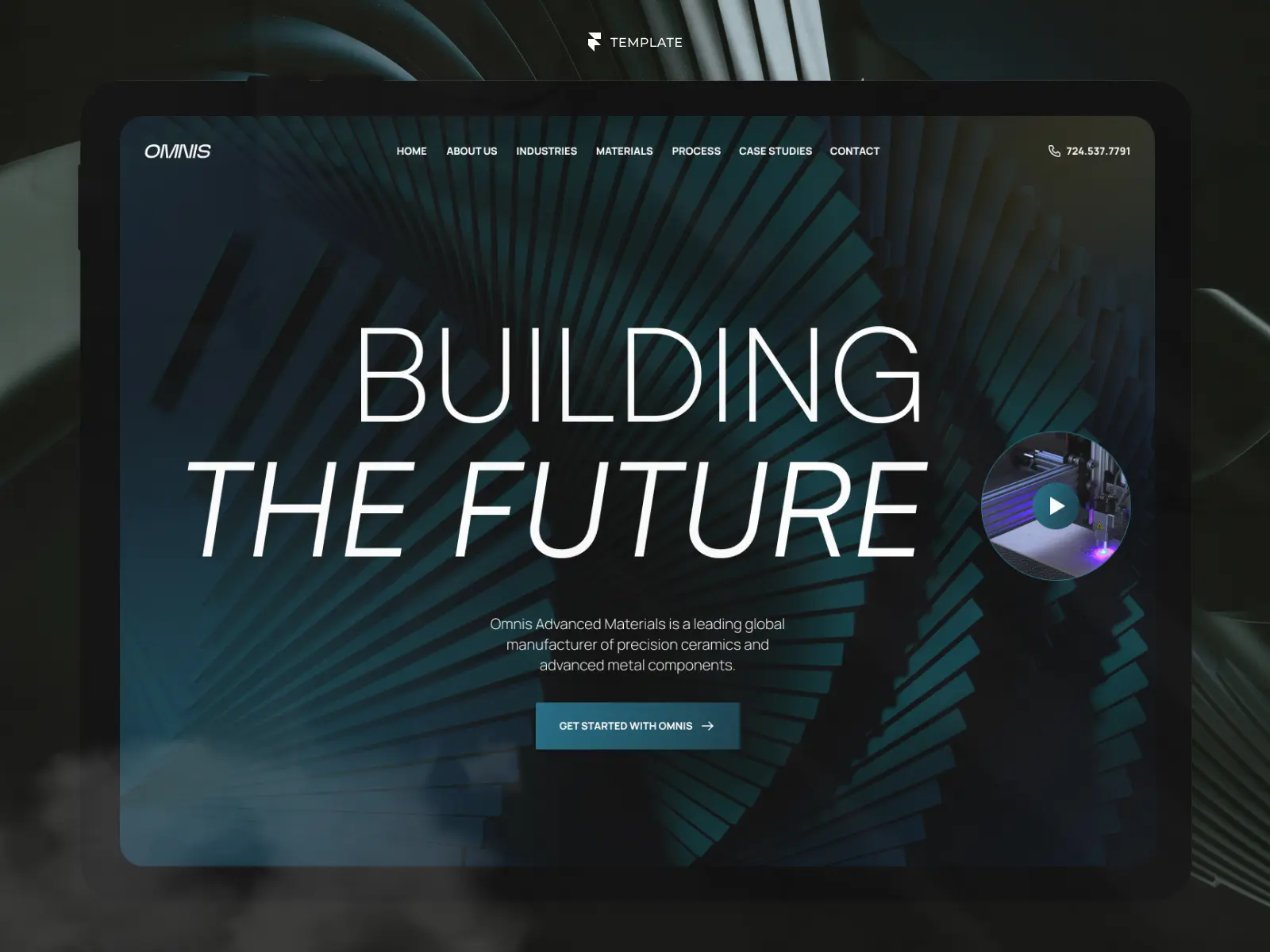
Precept takes a more industrial approach to technology. It is designed for robotics, advanced manufacturing and hardtech companies that need to explain physical capabilities, technical applications and real-world results.
The template includes more than 15 reusable components and CMS collections for capabilities, case studies, newsroom content and careers. Dedicated content structures allow companies to present engineering expertise, document applications and publish updates without forcing everything into a conventional SaaS feature page.
Why it stands out: Precept represents physical technology convincingly. Its modular layouts and technical visual language are better aligned with robotics and manufacturing than the software-dashboard aesthetic used by many technology templates.
What to consider: The same specialization makes it less appropriate for consumer apps or early-stage software products. Companies with highly regulated or technical buying processes may also need to add documentation, specifications or resource libraries beyond what the template includes.
Best Framer Templates for Professional Services
Professional service websites depend heavily on trust, clarity and evidence. Visitors need to understand what the business does, who it helps and why its expertise is credible before they are likely to make an enquiry. Optima Advisory and Dentora address those requirements at very different scales and in different industries.

12. Optima Advisory — Best for Technology Consulting Firms
Creator: Filip Sacer
Price: Free
Optima Advisory is an unusually extensive free template for consulting firms, advisory businesses and B2B technology companies. It includes more than 25 responsive pages covering services, industries, case studies, insights, proprietary frameworks, team members, careers, clients, locations and legal information.
Several CMS collections manage articles, news, case studies, clients, team members and job openings. Site search, localization and light and dark themes make the template suitable for organizations with a substantial amount of content or an international audience. A built-in ROI calculator gives consultancies an interactive way to communicate the potential value of their work.
Why it stands out: Optima provides the breadth normally associated with a large corporate website while remaining free. Its CMS architecture also supports continued publishing and organizational growth rather than just an initial launch.
What to consider: The template will be unnecessarily complex for many independent consultants and smaller firms. Its monochromatic design is adaptable, but brands seeking a warmer or more distinctive identity will need to invest time in changing more than the logo and accent color.
13. Dentora — Best for Dental and Private Healthcare Practices
Creator: João Barbosa
Price: $79
View on Framer Marketplace
Dentora is structured around the information and trust signals that patients look for when choosing a clinic. It includes CMS-powered services and treatment pages, clinical stories, team profiles, patient information, educational articles, contact forms and strategically placed appointment calls to action.
The separation between services, patient guidance and real outcomes helps clinics answer practical questions without overwhelming the homepage. Framer CMS also allows treatments, articles and case studies to be updated as the practice develops.
Why it stands out: Dentora is not a general business template with dental imagery added to it. Its page structure follows a recognizable patient journey: understand the treatment, assess the clinic’s expertise, review relevant information and make an enquiry.
What to consider: The healthcare specialization is fundamental to the template. Adapting it to an unrelated professional service would require replacing much of its content architecture. Clinics must also review all sample content carefully and provide their own accurate medical, privacy and regulatory information before publishing.
Best Framer Ecommerce Templates
Framer does not provide a complete native ecommerce system comparable to Shopify. Templates can create the storefront and product experience, but payments, inventory and order management normally depend on an external platform or plugin.
Both selections below use Shopify data through Frameship. Their listed prices do not include the required paid Shopify plan, Frameship licence or an appropriate Framer site plan.
For more options across physical products, digital goods, marketplaces, and product-focused brands, explore our curated ecommerce website templates.
14. Topshelf — Best for Larger Shopify Catalogs
Creator: Insert Frame
Price: $129
Topshelf is a 16-page Shopify storefront designed for brands with multiple product categories and a more substantial catalog. Its ecommerce components include a mega menu, category browser, product discovery carousels, promotional badges, collection layouts and a slide-in cart.
Live Shopify product data is integrated through Frameship, while CMS-powered product and help content provide additional flexibility inside Framer. Promotional tools such as a countdown timer, bestseller labels and clearance states make the template particularly suitable for active retail businesses running seasonal campaigns.
The purchase also includes a step-by-step setup course, which helps address the additional complexity introduced by connecting Framer, Shopify and Frameship.
Why it stands out: Topshelf goes beyond presenting a small selection of products. Its navigation, collections and promotional components are designed around the discovery needs of a larger store.
What to consider: The template introduces a multi-platform setup that is more complex and expensive than a standard Framer website. Smaller brands with only a few products may not need its catalog architecture or promotional features.
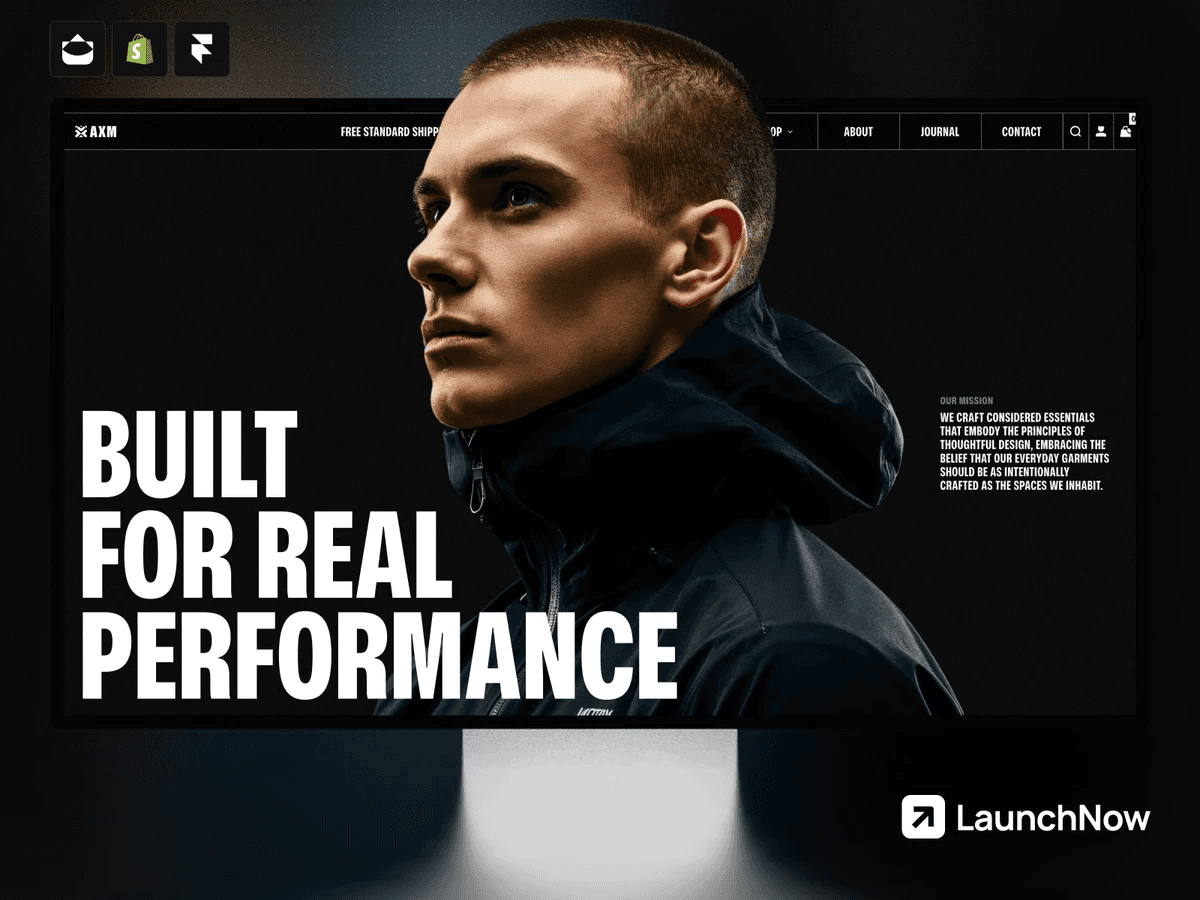
15. Axiom — Best for Premium Fashion Brands
Creator: Joseph Alexander
Price: $199
Axiom combines a restrained black-and-white direction with the product discovery features expected from a fashion store. It supports live Shopify data through Frameship and includes collection filtering, detailed product galleries, a size guide with unit conversion, an editorial journal and an Instagram ticker.
Its emphasis on typography, imagery and spacious layouts makes it particularly suitable for fashion brands that want their storefront to feel closer to an editorial experience than a generic product grid. Documentation is included to support setup and customization.
Why it stands out: Axiom balances brand presentation with functional product browsing. Features such as the size guide and journal are relevant to fashion retail rather than generic additions intended to lengthen the feature list.
What to consider: At $199, it is the most expensive template in this guide, before accounting for Shopify and Frameship. Its fashion-led layouts and monochrome identity are also less adaptable to stores with broad catalogs, highly technical products or a more colorful mass-market brand.
Also worth considering: Kanva, created by Pawel Gola, costs $99 and provides Shopify integration in a lighter, more minimal format. It is a more affordable option for smaller beauty, wellness and lifestyle stores that do not need Topshelf’s catalog depth or Axiom’s specialized fashion experience.
Best Framer Real Estate Templates
Real estate websites need to balance brand credibility with efficient property discovery. The strongest templates make listings easy to maintain, give buyers enough information to assess a property and create clear opportunities to contact the agent or agency. For a broader selection, explore our curated real estate website templates for agents, agencies, and property businesses.
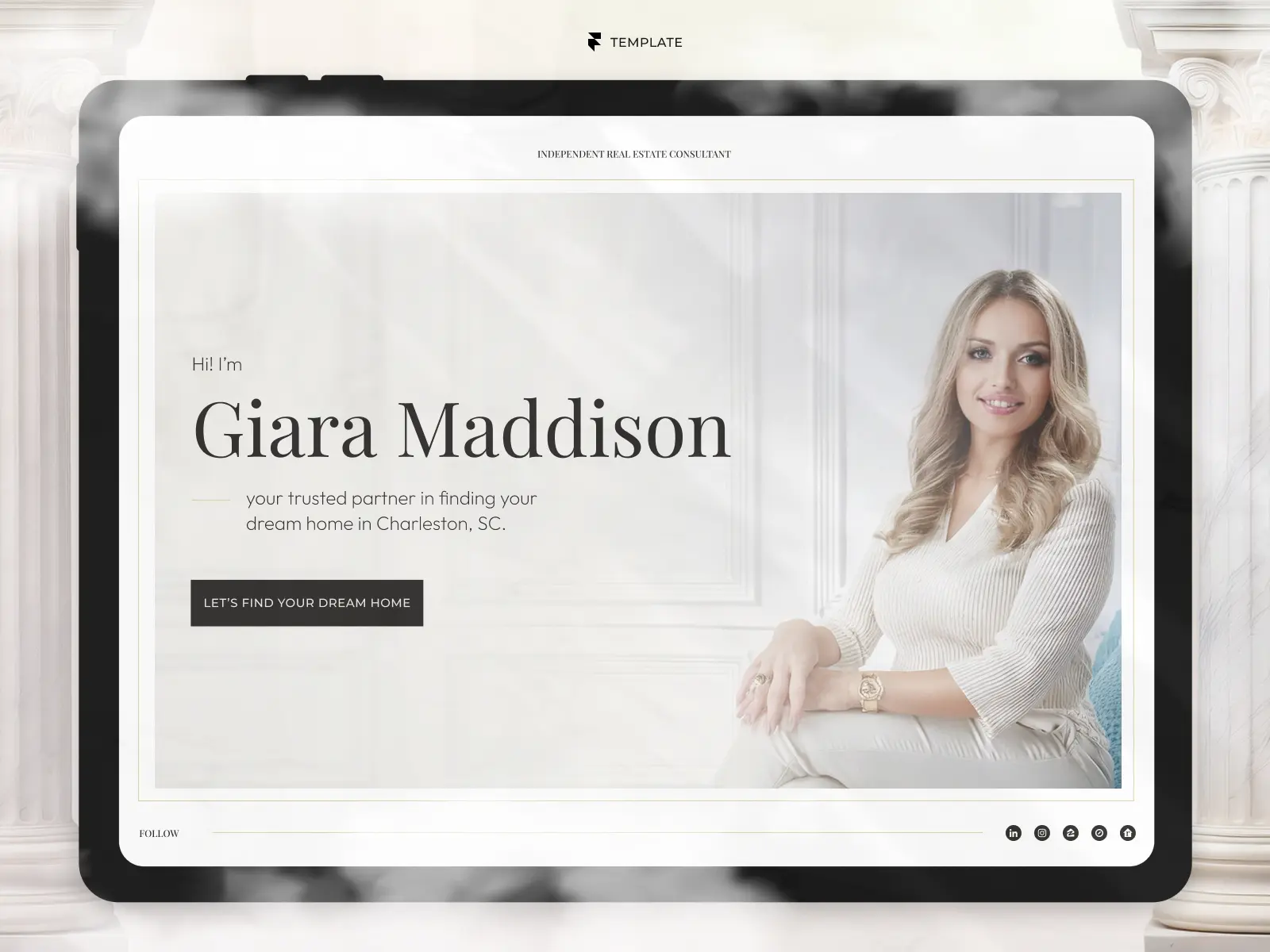
16. Giara — Best for Luxury Agents and Boutique Agencies
Creator: João Barbosa
Price: $99
View on Framer Marketplace
Giara is designed for luxury real estate agents and boutique agencies that want a refined brand presence without reducing the website to large property photography. Its CMS supports active properties, past transactions and articles, while individual pages provide space for detailed listings and sold-property records.
Visitors can filter properties by type and price range, helping them narrow a collection before opening individual listings. Services, testimonials, previous transactions and enquiry calls to action support the wider sales argument around the agent’s expertise.
Why it stands out: Giara combines a distinctive, hospitality-influenced visual direction with the practical structure of a working property website. Past transactions are treated as a dedicated source of credibility rather than mixed into the active inventory.
What to consider: The design is intentionally aligned with luxury residential property and takes inspiration from Charleston’s architecture. Commercial agencies, large brokerages or technology-led property platforms will need to adapt its tone and visual identity more substantially.
17. Listings — Best for Flexible Realtor and Agency Websites
Creator: Redwan Hasan Rahat
Price: $99
Listings includes two homepage options: one for an agency and another for an individual realtor. This makes it a flexible starting point for solo professionals, small teams and more conventional property businesses without requiring the homepage to be reconstructed.
Properties and articles are managed through Framer CMS, while advanced search and filtering help visitors navigate listings. The template also includes service, process, testimonial and enquiry sections, along with a written guide explaining how to customize its CMS content and more advanced components.
Why it stands out: Listings provides a practical middle ground between a personal agent website and an agency platform. The two homepage directions and accompanying documentation reduce the amount of structural work required before launch.
What to consider: Its versatility comes at the expense of a more recognizable visual identity. It also provides less specialized content around neighborhoods and sellers than some alternatives.
Also worth considering: Jenson, created by Miru, costs $59 and is particularly strong for independent agents. Its CMS-powered neighborhood guides, property status filters and seller-focused content make it a compelling lower-priced alternative when local expertise and personal branding matter more than agency flexibility.
Best Framer Blog and Publication Templates
A strong publication template should do more than display a chronological list of posts. Categories, authors, search and readable article layouts become increasingly important as an archive grows. Reado is built for a broader multimedia publication, while Noter offers a more restrained foundation for writers and small editorial teams.
18. Reado — Best for Multimedia Publications
Creator: Salim from Webestica
Price: Free
Reado supports articles, podcasts and newsletters within a single editorial system. Its dedicated podcast area includes an overview, individual episode pages and CMS management, while the article system provides authors, categories, search and dedicated archive pages.
Individual articles include an automated reading-time estimate, social sharing and a progress indicator with a table of contents. Featured and pinned posts help editors control what receives attention, while newsletter sections and advertising spaces support audience growth and monetization.
Why it stands out: Reado contains many of the navigation and publishing tools expected from a genuine digital publication. The podcast system also gives it a meaningful use case beyond conventional blogging.
What to consider: Solo writers may find the structure unnecessarily extensive. Removing the podcast system is possible, but a simpler template may be more efficient if the website will only publish occasional articles. The included advertising spaces are layouts rather than an integrated advertising platform.
19. Noter — Best for Independent Writers and Small Publications
Creator: FramerMake
Price: Free
Noter uses restrained typography, high contrast and generous spacing to prioritize reading. Its connected CMS manages posts, categories and authors, with dedicated author profiles and category browsing that can support either an individual writer or a small editorial team.
The template also includes site search, several article-card layouts, a newsletter section and a dedicated advertising position. These features give a relatively minimal website enough structure to grow without making it feel like a large news platform from the outset.
Why it stands out: Noter achieves simplicity without discarding the CMS relationships and discovery tools that become important as more content is published.
What to consider: Its monochrome, type-led identity will not suit every subject. Publications built around fashion, travel, food or visual culture may need a more image-driven homepage and a broader color system.
Best Free Framer Templates
Several templates already included in this guide are free, including Tabfolio, Optima Advisory, Reado and Noter. The final two selections demonstrate how much specialization and structural depth can also be found without an initial template cost.
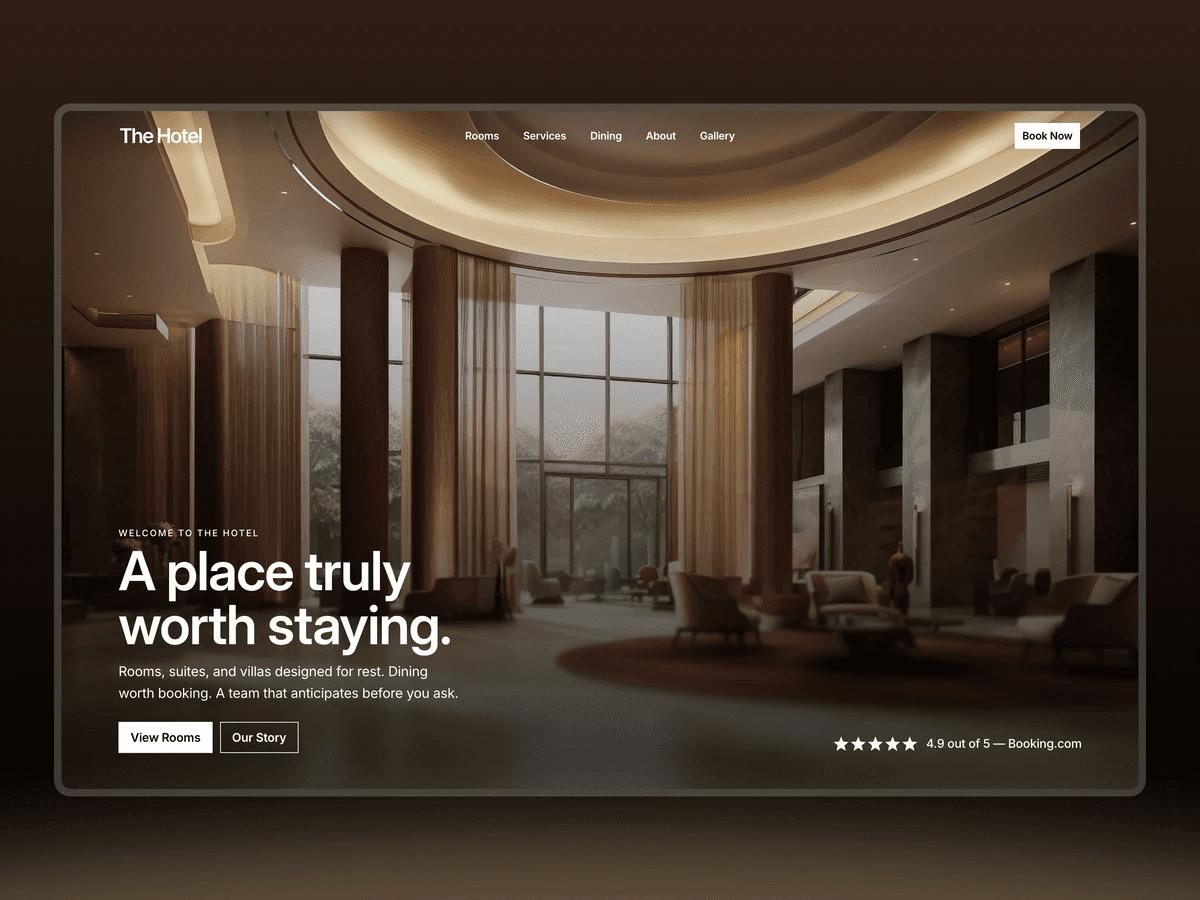
20. The Hotel — Best Free Template for Hospitality
Creator: Damir Cosic
Price: Free
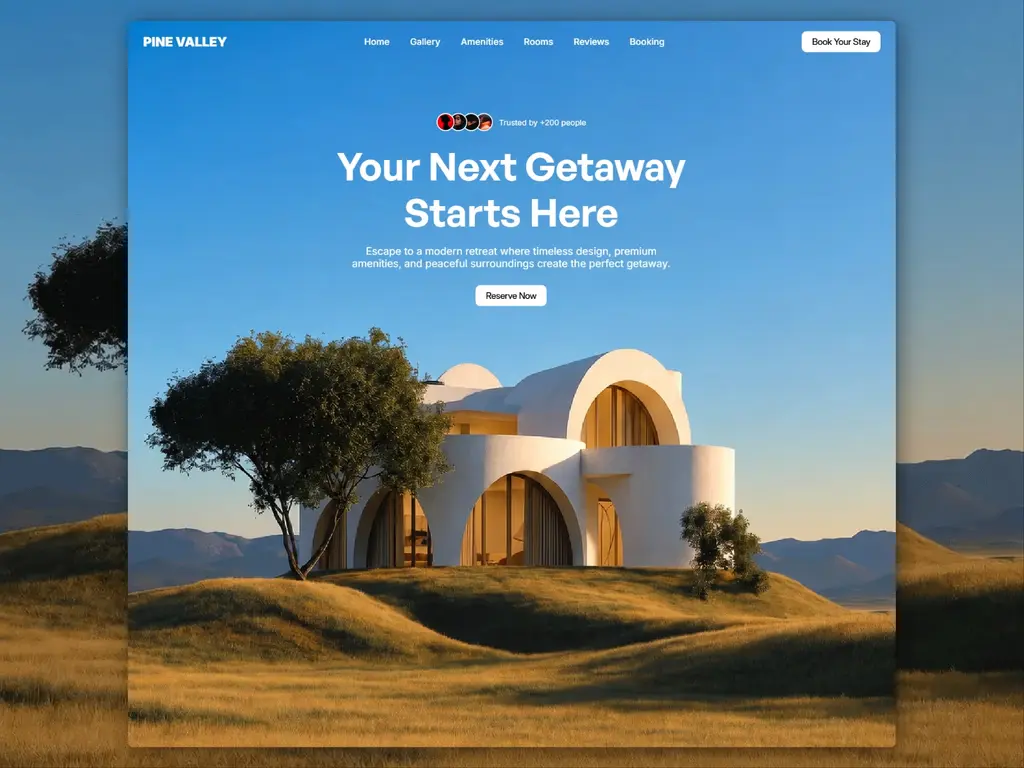
The Hotel includes 12 pages, nine CMS collections and a reusable design system for hotels, resorts and bed-and-breakfast businesses. Its content covers rooms, services, dining, testimonials, articles, team members, frequently asked questions, galleries and legal pages.
Room pages contain a persistent booking card, while booking calls to action remain visible throughout the wider website. The template also includes a spreadsheet and guided AI setup process intended to update static content and populate CMS collections using Framer Agent and Claude.
Why it stands out: Its page depth and CMS architecture would be substantial even for a paid template. It reflects the wider information needs of a hospitality business rather than stopping at a homepage and room listing.
What to consider: The template does not provide its own availability or reservation engine. Booking actions must connect to an external service. Its assisted setup process also assumes access to compatible AI tools and some familiarity with prompts, agents and MCP; users can still configure the content manually.
21. Toolio — Best Free Template for Directories
Creator: Kosta
Price: Free
Toolio is designed for curated directories of software, design resources, products or affiliate recommendations. It includes 13 pages and two connected CMS collections for entries and categories, allowing the same resource to appear in several relevant sections.
Search, category filtering and load-more pagination make larger collections easier to navigate. Individual entries include previous and next navigation, while the wider system provides featured items, pricing labels, hover previews, loading states and a responsive sidebar. SEO titles, descriptions and social images are also connected to CMS fields on detail pages.
Why it stands out: Toolio provides a functional content architecture for a comparatively uncommon website type. Adding a new directory entry is primarily a CMS task rather than a design task.
What to consider: It is not a marketplace platform. User accounts, public submissions, payments and automated affiliate tracking are not included. Toolio was also released recently, so it has less public usage history than longer-established templates.
Also worth considering: Supply, created by Cédric, is a free template for selling digital products through Lemon Squeezy. It includes product content in CMS, site search and light and dark themes, making it a useful alternative for creators who need a focused storefront rather than a directory.
How to Choose the Right Framer Template
A template can be visually impressive and still be the wrong starting point for your website. Before purchasing or remixing one, compare its structure with the content, features and workflows your project actually requires.
1. Start With the Website’s Main Objective
Define the primary action you want visitors to take. A SaaS website may prioritize trial signups or demo requests, while a clinic needs appointment enquiries and a publication needs readers to discover more articles.
The template should create a clear path towards that objective. If its entire structure points towards a different outcome, adapting it may take more work than choosing a less visually appealing but better-aligned alternative.
2. Check Every Included Page
Do not evaluate a template from its homepage alone. Review its service pages, CMS detail pages, contact forms, legal pages, mobile layouts and any states that visitors will encounter.
A polished homepage provides limited value if the project pages, article layouts or navigation require substantial reconstruction. Make a list of the pages your website needs and compare it with what the template actually includes.
3. Inspect the CMS Structure
Framer CMS becomes increasingly important when a website contains repeated content such as properties, products, projects, articles, jobs or team members.
Check which collections are included, how they relate to one another and whether filtering or search is already configured. A well-planned CMS can save considerable setup time, while an unsuitable structure may be harder to modify than the visible design.
4. Test the Mobile Experience
Marketplace imagery naturally emphasizes large desktop layouts, but many visitors will encounter the finished website on a phone. Open the live preview on different screen sizes and inspect navigation, forms, filters, typography and media performance.
Pay particular attention to templates with horizontal scrolling, large video files, 3D elements or complex interactions. These features should support the experience rather than make essential content more difficult to access.
5. Confirm Integrations and Additional Costs
A template’s price may only be one part of the total cost. Ecommerce functionality, booking systems, authentication, gated content, advanced forms and automation can depend on external services or paid plugins.
Before buying, confirm which functions are native to Framer, which are visual demonstrations and which require another subscription. For example, the complete ecommerce experience in Topshelf and Axiom depends on Shopify and Frameship.
6. Choose a Design You Can Adapt
A template does not need to look exactly like your intended brand, but its underlying visual logic should be compatible with it. Typography, spacing, image proportions and interaction patterns often influence the identity more than the color palette.
Changing colors and logos is easy. Reworking every composition because the template relies on a fundamentally unsuitable art direction is not.
7. Check the Update History and Licence
Recent updates can indicate that a template has been adapted to changes in Framer and that the creator is still maintaining it. However, an older template is not automatically outdated if it remains well structured and has been updated when necessary.
Always read the licence before using a template. Do not assume that purchasing or remixing it gives you permission to use it across multiple client projects.
Free vs. Premium Framer Templates
Free Framer templates are not necessarily simpler or lower quality. Optima Advisory, Reado and The Hotel are among the most structurally complete options in this guide, despite having no initial purchase price.
Paid templates tend to justify their cost through one or more of the following:
More pages and reusable sections
Deeper or more specialized CMS systems
Custom components and code overrides
Documentation and setup resources
Integrations with external platforms
A more distinctive art direction
Ongoing updates or direct creator support
However, price alone is not a reliable quality signal. A paid template can still be poorly matched to the project, while a focused free template may provide almost everything required.
The more useful comparison is the total effort needed to reach a finished website. A free template that requires several days of restructuring may ultimately cost more than a paid alternative that is already aligned with the project.
Frequently Asked Questions
What is the best Framer template?
There is no single best Framer template for every website. The right choice depends on the project’s audience, required pages, CMS structure, integrations and visual direction. Flowpath is a strong option for complex SaaS products, for example, while Giara and Anamorph are designed for entirely different real estate and video use cases.
Are Framer templates worth paying for?
They can be, particularly when the template closely matches the website you need to build. A good paid template can save time on page structure, responsive layouts, CMS setup and reusable components. Before purchasing, compare those savings with the amount of customization still required.
Can I use a Framer template for multiple websites?
Not necessarily. Many paid Framer templates use a single-use licence, while free templates may have their own limited licence terms. Always check the specific Marketplace listing and creator’s licence before reusing a template for another personal or client website.
Can Framer templates be customized?
Yes. Templates remixed into Framer can generally be edited through the same visual canvas used to build other Framer websites. You can change text, colors, typography, media, components, page layouts and CMS content. Custom code components or advanced interactions may require additional care when modifying them.
Does Framer support ecommerce?
Framer can be used to design and publish an ecommerce storefront, but a complete store typically relies on an external platform or plugin for products, inventory, checkout and order management. Common setups connect Framer to services such as Shopify or Lemon Squeezy. Check what each template includes before assuming that its demo represents a complete native ecommerce system.
Are free Framer templates good enough for professional websites?
Yes, provided that the template fits the project and is carefully customized. A professional result still requires accurate content, appropriate imagery, a coherent brand identity, responsive testing, accessibility checks and correct SEO settings. The template price does not replace that work.
What should I check before buying a Framer template?
Review the complete live preview, page list, CMS collections, mobile layouts, required plugins, licence, update history and available documentation. You should also confirm whether forms, filters, checkout experiences or booking flows are functional or only visually represented in the demo.
Final Thoughts
The best Framer template is not always the most visually dramatic or the one with the longest feature list. It is the one that provides the right foundation for the website you need to launch.
Start with structure: the required pages, CMS collections, visitor journeys and integrations. Then assess whether the visual system can be adapted to the brand. This approach makes it easier to distinguish a useful template from an attractive demo that will require extensive rebuilding.
The 21 templates in this guide represent different answers to that problem. Some prioritize flexibility, others specialization, and several free options compete directly with paid alternatives. If none is the right fit, the same criteria can help you evaluate the wider Framer Marketplace or explore other curated templates on GYFT.

Try Systeme.io
Your website is only the beginning.
Take your Framer site further with funnels, email marketing, automation, bookings and more.


AFFILIATE PARTNER